Skip to content
chat
01
Chat
Channels, threads, voice notes, polls.
view_kanban
02
Tasks
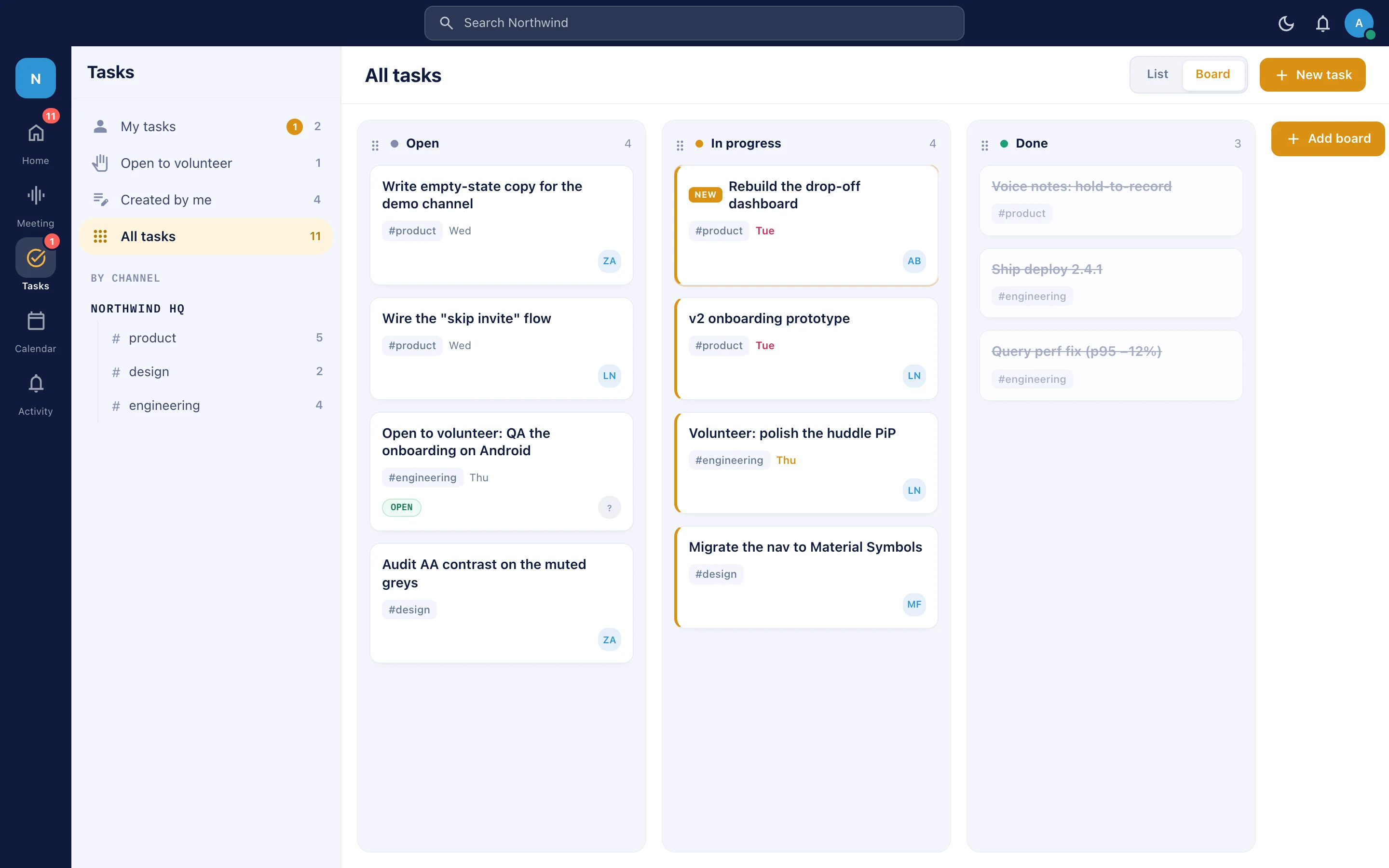
Kanban boards born in the conversation.
calendar_today
03
Calendar
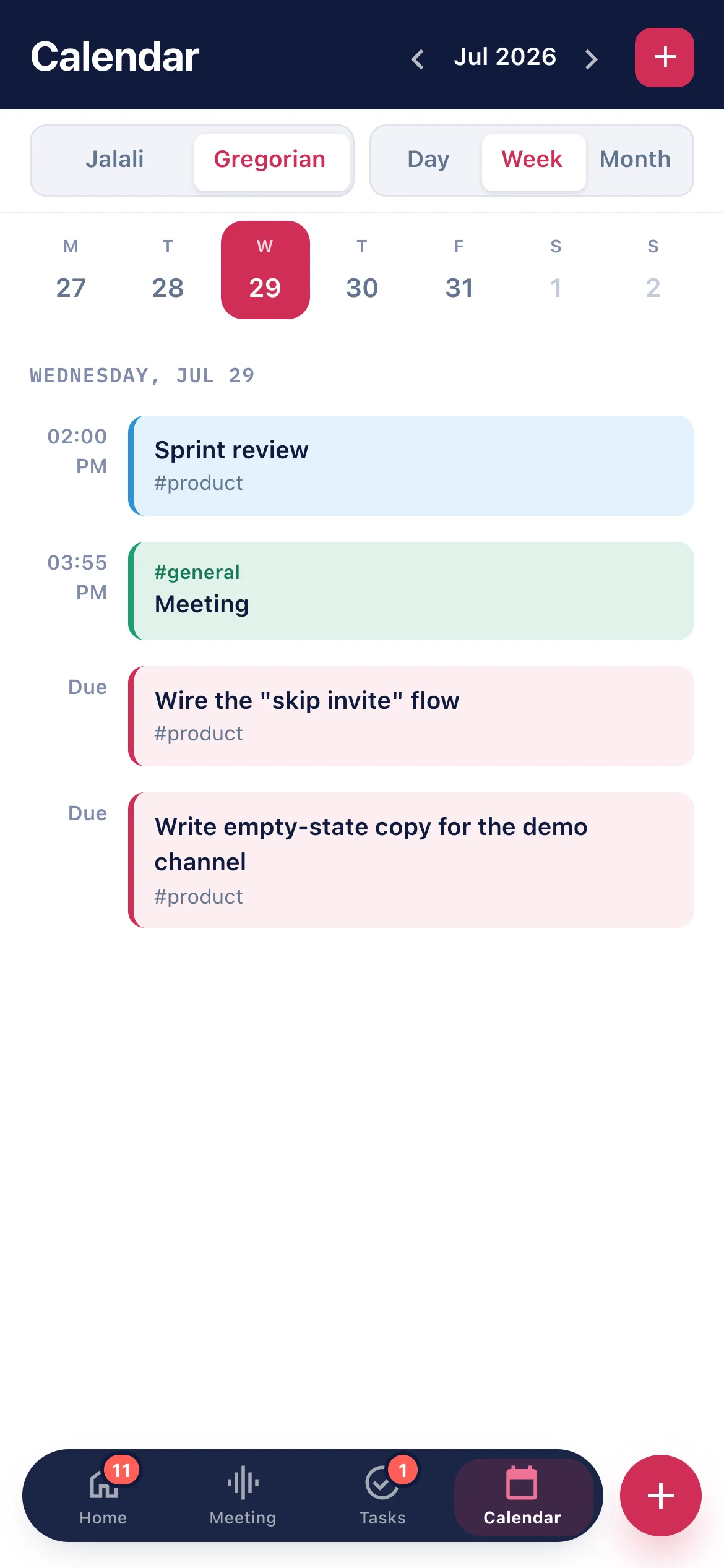
Day, week and month, next to the work.
videocam
04
Meetings
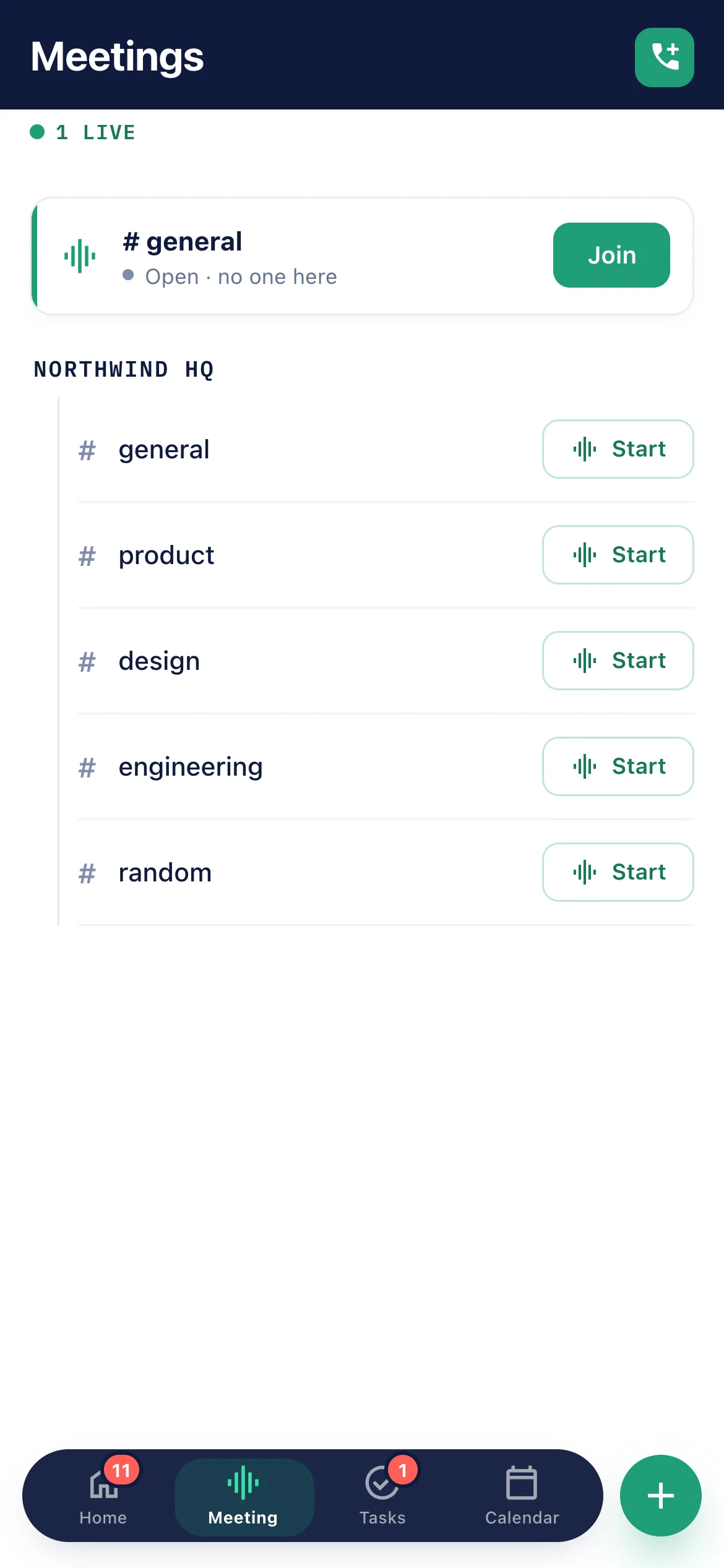
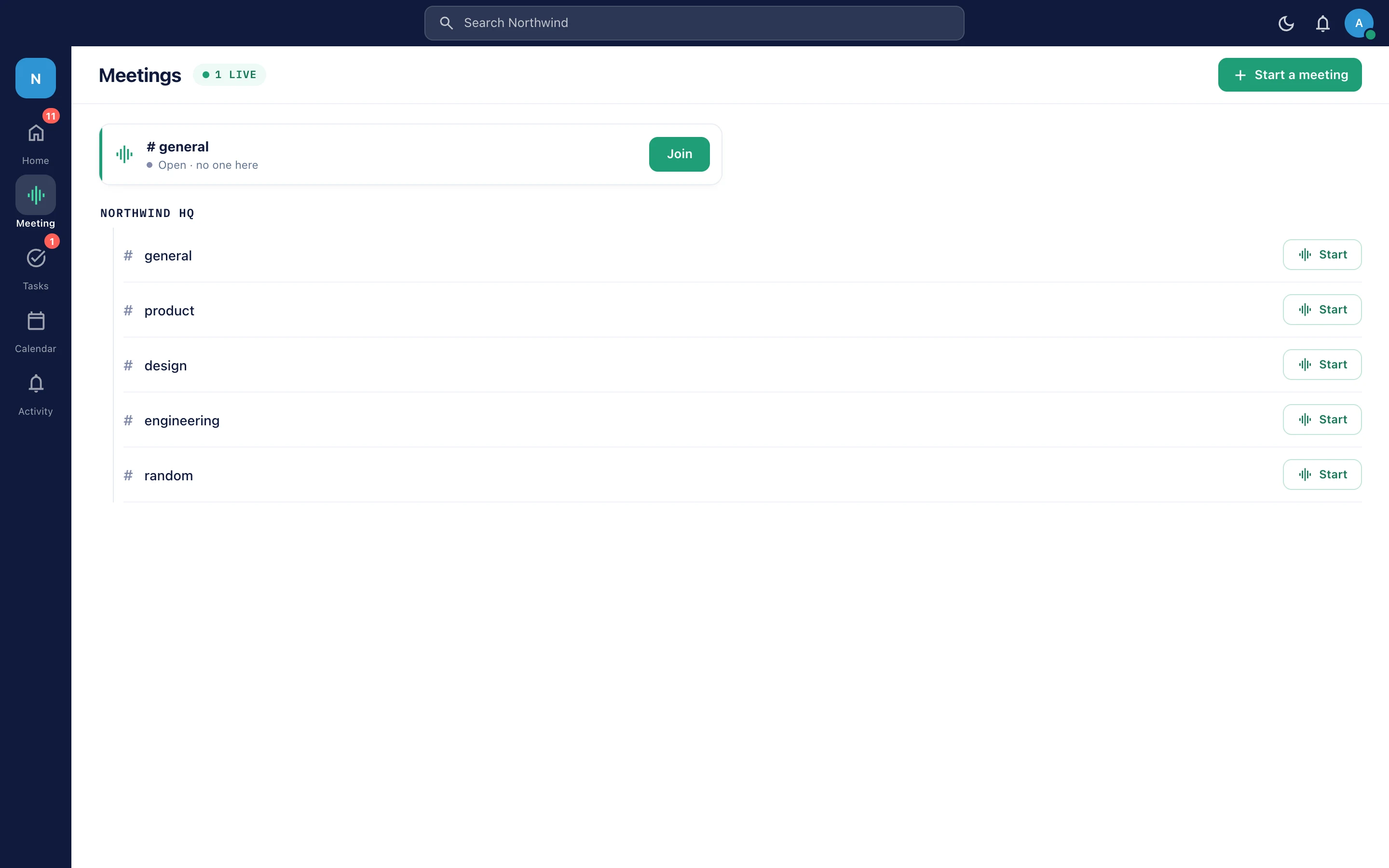
One-click voice and video huddles.
four tools · one workspace · one bill

Four apps walk in. One workspace walks out.

Chat, tasks, calendar and voice-video huddles in one real-time app your team installs in about thirty seconds. Four subscriptions, four logins and four places a decision can hide — gone by Friday.

Four colours, four tools you cancel
Blue — Chat
replaces your messaging subscription
Yellow — Tasks
replaces your Kanban tool
Red — Calendar
replaces your team calendar
Green — Meetings
replaces your video plan
trusted by teams at[LOGO][LOGO][LOGO][LOGO]
How the merge actually works

Four apps on the left. One on the right. Identical work.

Drag the handle. On one side: the windows your team alt-tabs between, each with its own unread count and its own search box. On the other: the same Wednesday, in one window.

← your stack todaydrag, or use ← → keysviratim →
3 logins gone
One account and one invite list instead of four half-synced ones.
1 search box
Messages, files and tasks in one index — not three partial ones.
0 lost context
A task is a message in its channel; a huddle starts from the same thread.
1 invoice
And one permission model to explain to whoever signs it off.
01
Chat

Conversation that keeps its context

Workspaces hold groups of channels in a collapsible tree. Threads keep the side-quests tidy, quote replies point at the exact line that mattered, and reactions show who reacted rather than just how many.

Voice messagesHold to record, slide to lock, waveform with click-to-seek.
PollsBuilt in the composer, anonymous option, vote breakdown.
AttachmentsImages, video and files with inline previews and progress.
Direct messagesOne-to-one and group DMs with the same rich messaging.
More on Chat →
app.viratim.com
DESKTOP SCREENSHOT — chat view with channel sidebar and thread panel
02
Tasks

Boards that never lose the thread

Drag-and-drop Kanban with system and custom columns you name yourself. Every task is also a message in its channel, so the argument that produced the work stays attached to it.

Assign or claimGive a task to someone, or open it for volunteers.
Dates & flagsDue dates, overdue flags, assignees, descriptions.
Filter railMy tasks, open to volunteer, created by me, by channel.
ViewsBoard or list, with a detail overlay over the conversation.
More on Tasks →
app.viratim.com
DESKTOP SCREENSHOT — Kanban board with task detail overlay
03
Calendar

The week, beside the work that made it

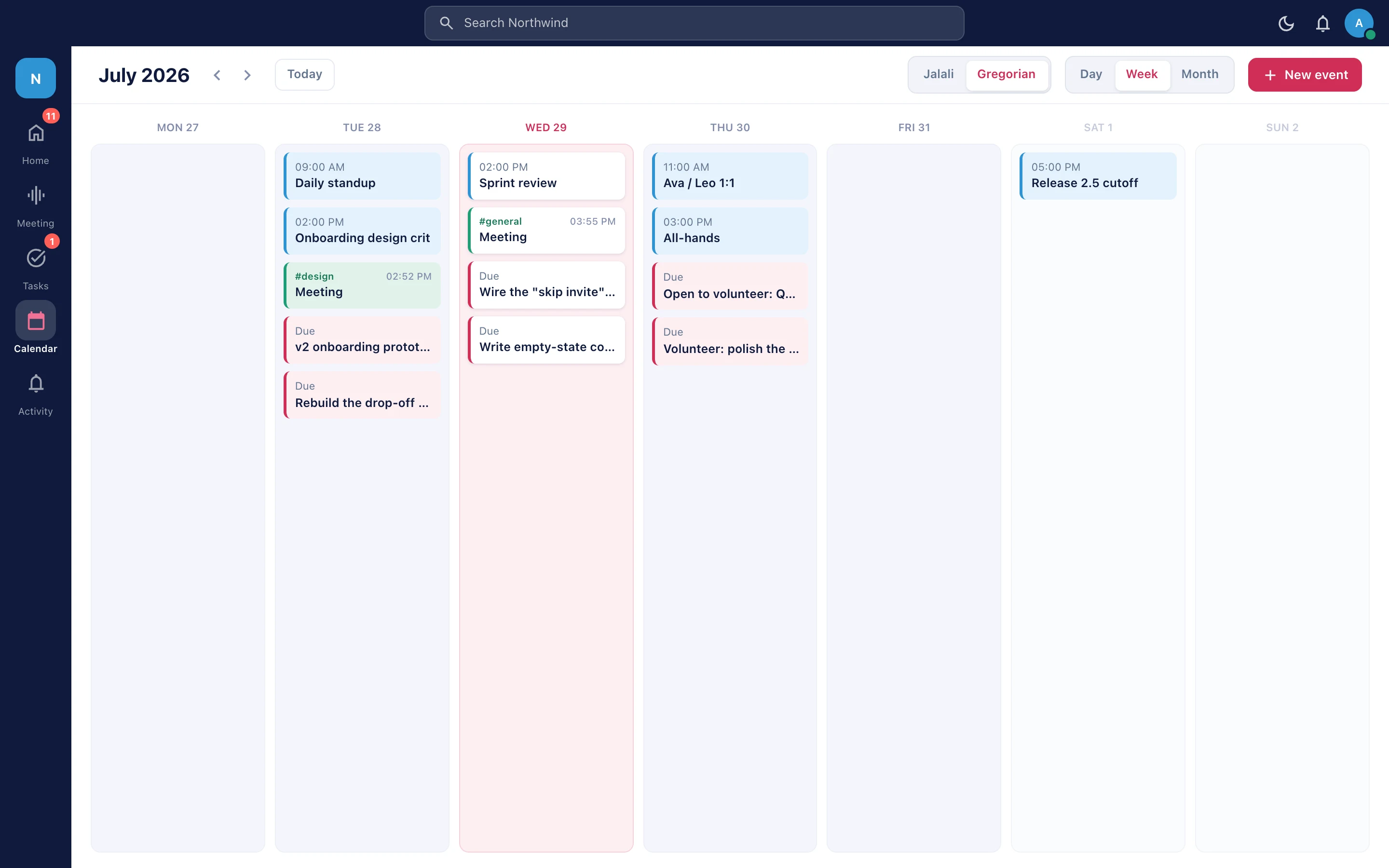
Workspace events in day, week and month views — created and edited in the same app as the thread and the board, and announced by web push even when Viratim is closed.

Day / week / monthThe view that matches how your team plans.
Workspace eventsCreate, edit and delete without leaving the workspace.
Push remindersWeb push reaches people with the app shut.
More on Calendar →
MOBILE SCREENSHOT — calendar month view
04
Meetings

A call is a click, not a calendar invite

Start or join a live voice or video huddle from any channel or DM. LiveKit media keeps latency low, and picture-in-picture keeps the call alive while you work somewhere else in the app.

Screen shareCamera filmstrip alongside, or full gallery view.
Live reactionsFloating emoji during the call — never stored.
LIVE NOW hubEvery active room in the workspace, one tap in.
More on Meetings →
MOBILE SCREENSHOT — huddle with participant grid
Message → task → huddle → event

Scroll the strip — the work never leaves the app.

In a four-app stack, every handoff is a copy-paste and a pasted link. Here one object moves through four coloured stages and keeps its whole history.

chat01 · Chat
Where the decision is actually made
It starts as a thread with a quote reply and three reactions, not as a ticket someone remembers to file later.
handoff → task, in place

viratim / # product
DESKTOP SCREENSHOT — thread with quote reply
view_kanban02 · Tasks
The message becomes the card
Same object, new column: assigned or open to claim, due Friday, still linked to the conversation that argued for it.
handoff → huddle, one click
viratim / board
DESKTOP SCREENSHOT — task card mid-drag between columns
videocam03 · Meetings
Talking about it takes one click
A huddle opens on the card: screen share, live reactions, and picture-in-picture while you edit it mid-call.
handoff → calendar, no invite links
viratim / huddle
DESKTOP SCREENSHOT — huddle with screen share + filmstrip
calendar_today04 · Calendar
The follow-up gets a date
Thursday at 14:00, announced by push, governed by the same permissions as everything else in the relay.
back to # product, same object
viratim / calendar
DESKTOP SCREENSHOT — calendar week view
all_inclusive
Then back to the channel, with nothing retyped.
Thread, card, call and event are one workspace object — one permission model, one search index, one history.
Start free
arrow_forwardscroll the strip sideways
Real-time, not refresh-time

It doesn't load. It's already there.

Messages, typing, presence, task moves and call state ride one live socket — nothing polls, nothing waits for a reload. The panels below are running the real interaction model right now.

socket open · 31ms
#product12 onlinegraphic_eq
NM
Nima09:41
Board is green — moving the voice-notes card to Done.
🔥3done_all
DA
Dana09:41
Starting a huddle in here, jump in for five minutes?
👍5done_all
SA
Saratyping
moodmic
task_altSprint boardmoved by Nima
Open
In progress
Done
Ship voice notes
NMFri
A task is also a message in its channel — drag it here, everyone sees it there, in the same tick.
videocamHuddle · # productlive
DANMSA+4
One click from any channel — screen share, live reactions, and picture-in-picture so the call survives you walking to the board.
Try a real component

This poll isn't a graphic. It's the product.

Polls are built right in the composer — anonymous if you want, with a vote breakdown and tap-to-deselect. Go on, vote. Then imagine it in the channel where your team argues about tooling.

Anonymous optionView votesTap to deselectLive results
Viratimapp09:48
how_to_votepoll · anonymous
Which subscription would you cancel first?
100 votes·your vote stays anonymous
Surface

The part your team actually looks at.

three-pane desktop · floating-nav mobile
app.viratim.com — installed PWA
[DESKTOP SCREENSHOT — three-pane workspace: rail + channel sidebar + conversation]
16:10 · drop screenshot here
[DESKTOP SCREENSHOT — three-pane workspace: rail + channel sidebar + conversation]
[MOBILE SCREENSHOT — Kanban board, floating nav]
[MOBILE SCREENSHOT — Kanban board, floating nav]
Three-pane desktop
Rail, sidebar, main — the shape power users expect.
Floating mobile nav
Feature-coloured action button, thumb-reachable.
Instant skeletons
Prefetching and skeleton loading, so nothing feels like a page load.
Light first, navy dark
Light mode is the default; dark is a full navy system.
Every other screen, too
Activity, directory, permissions, search, saved items, task detail — all in the same window, all governed by the same roles.
viratim / activity
[SCREENSHOT — activity feed: mentions & task activity]
[SCREENSHOT — activity feed: mentions & task activity]
viratim / members
[SCREENSHOT — member directory & profile]
[SCREENSHOT — member directory & profile]
viratim / settings
[SCREENSHOT — permissions matrix: capability × scope]
[SCREENSHOT — permissions matrix: capability × scope]
viratim / search
[SCREENSHOT — search across messages, files, tasks]
[SCREENSHOT — search across messages, files, tasks]
viratim / saved
[SCREENSHOT — saved items]
[SCREENSHOT — saved items]
viratim / task
[SCREENSHOT — task detail overlay over conversation]
[SCREENSHOT — task detail overlay over conversation]
The invoice test

Four subscriptions, one workspace, and the difference stays in your account.

Drag to your team size. These are list prices for a typical four-tool stack — swap in your own invoices and the shape doesn't change.

your team size24seats
3100400
what you pay today
Chat & channels$8 / seat$192/mo
Video meetings$15 / host × 25%$90/mo
Kanban boards$10 / seat$240/mo
Team calendar$4 / seat$96/mo
Four subscriptions$618/mo
Viratim, all four included
$9 / seat / month · nothing gated by tier
$216/mo
you stop spending
$4,824
a year at 24 seats — before you count the hours nobody spends switching apps or re-explaining a decision in a second tool.
$402 / month3 logins gone
then start free
No card, no sales call, no migration project.

Sign up with email or Google, install the PWA everywhere, invite the team. Cancel the other three when you're convinced — not before.

Grown-up controls

Permissions your ops lead will actually sign off.

A capability × scope model: grant view, send, reply, task and moderation rights at workspace, group or single-channel level. Roles for the shape of your org, per-member grants for the exceptions, private channels through the same model.

right-to-left, first class
سارا
سارا
جلسه فردا ساعت ۱۴ — تسک‌ها به‌روز شد.
English · فارسی · العربية — layout mirrors, not just the text
shield_lock
Capability × scope
Rights granted at workspace, group or single-channel level — not one blunt admin switch.
groups
Roles + grants
Founders, Employees, External — plus per-member exceptions layered on top.
key
Hardened auth
HttpOnly cookies, token rotation, safe OAuth linking, email or Google sign-in.
folder_supervised
Inspected uploads
Magic-byte MIME verification and size limits on every shared file.
notifications_active
Notifications that obey
Mentions and thread replies always reach you; muted channels stay muted.
translate
RTL from day one
English, Persian and Arabic with mirrored layout, not reflowed text.
Where it runs

One install, every device, no app store.

Viratim installs straight from the browser as a PWA — docked on desktop, on the home screen on mobile, offline-aware, haptic, with iOS-tuned chrome and web push that arrives when the app is closed. Native builds are coming; the PWA is what makes waiting for them optional.

Install the PWA
install_desktop
PWA — every device
available today
macOS, Windows, Linux, iOS and Android browsers.
phone_iphone
iOS app
coming soon
Native build in progress. The PWA installs to the home screen today.
android
Android app
coming soon
Native build in progress, sharing the same real-time core.
Two ways to buy

Subscribe to ours, or own yours.

Same product, two shapes: our managed cloud per seat, or a single-tenant instance you pay for once and run where your compliance team wants it.

Subscription · our cloud
Per seat, monthly, all four tools

Sign up, invite the team, work in the next minute. Chat, huddles, tasks and calendar are on every plan — there is no tier that hides one of the four.

check_circleChat, huddles, tasks and calendar on every plan.
check_circleReal-time delivery, presence, typing and web push.
check_circleOne search across messages, files and tasks.
check_circleGranular permissions, roles and private channels.
check_circleInstallable PWA on every device, no app store.
Start free — no cardemail or Google sign-in
Dedicated instance · perpetual licence
Your own Viratim. Paid once.

A single-tenant instance deployed for your organisation alone — on our managed infrastructure or inside your own servers. One-time payment, perpetual licence, no per-seat creep as you hire.

dnsSingle-tenant — a separate instance, your data isolated from everyone else’s.
cloud_syncManaged private hosting on our infrastructure, or on-premise on yours.
paymentsOne-time payment, perpetual licence — no recurring per-seat cost.
policyData sovereignty and compliance inside your own perimeter.
engineeringYou submit a request; we deploy, configure and hand it over.
break-even at 24 seatsmonth 26
Cumulative subscription spend against a one-time licence of about $5,600. After the crossing, the instance is simply yours.
month 1month 16month 32
cumulative subscriptionone-time licencepast break-even
Licensed, not sold: you receive a licence to run Viratim, and source code is not included. Instances are provisioned by our team from your request — there is no checkout for this option.
Request a dedicated instancesubmit a ticket · we deploy
Before you ask

The questions that decide it.

Still something missing? Ask sales — the same ticket that provisions dedicated instances.

No. Most teams start with one group of channels, keep the old tools open for a fortnight, and cancel them once nobody is opening them. Viratim is free to start and there is no migration project to schedule.

Move the team into one app this week.

Start a free workspace, install it on every device, and see how many subscriptions you can cancel by Friday. Bigger organisation? Ask us for a dedicated instance instead.
Start free — no cardTalk to salesinstalls in ~30 seconds · cancel anytime